为 ClaudeCode 写一个 Windows 消息提醒插件
为 ClaudeCode 写一个 Windows 消息提醒插件
为 ClaudeCode 写一个 Windows 消息提醒插件:用法、功能与关键设计
最近我为 ClaudeCode 写了一个本地消息提醒插件,目标是让 AI 协作过程中的重要事件不再埋伏在终端输出里,而是直接通过 Windows 通知提醒你。
这篇文章从使用方式、主要功能和关键技术设计三个方面做一个清晰的介绍。
一、为什么要做这个插件
ClaudeCode 在实际使用中会触发一些关键事件:
- 等待用户回答时
- 任务执行完成时
- 运行失败时
- 发生授权或提醒事件时
如果只有命令行提示,开发者很容易在切换窗口或离开电脑时错过这些状态。 于是我选择把这些事件接入 Windows 原生通知,让它们变成“可感知”的弹窗提醒。
二、插件的主要功能
这个插件让 ClaudeCode 的重要事件变成桌面通知,让你随时掌握 AI 助手的状态:
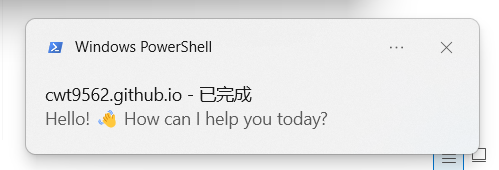
- 任务完成提醒:当 ClaudeCode 执行完任务时,你会收到桌面通知,标题显示当前项目名,内容是最后一条助手消息。
- 错误及时告警:如果运行过程中出现错误,插件会立即弹出通知,告诉你具体错误类型和摘要信息。
- 交互式提醒:当 ClaudeCode 需要你回答问题时,会弹出通知提醒你及时响应。
- 状态变化通知:包括等待继续、授权提醒等各种状态变化,都会通过通知告知你。
- 智能内容处理:通知内容会自动截断过长的文本,确保显示效果良好。
- 兼容性保障:支持现代 Windows 的原生 Toast 通知,如果不可用则回退到托盘气泡通知。
下图是本插件触发的 Windows 通知示例:
三、如何安装与使用
- 修改
C:\Users\<当前用户>\.claude\settings.json,添加hook。 - 将完整脚本保存到
C:\Users\<当前用户>\.claude\windows-notification.ps1。
3.1 settings.json 内容
把 hooks 的配置保存到 C:\Users\<当前用户>\.claude\settings.json。
1
2
3
4
5
6
7
8
9
10
11
12
13
14
15
16
17
18
19
20
21
22
23
24
25
26
27
28
29
30
31
32
33
34
35
36
37
38
39
40
41
42
43
44
45
46
47
48
{
  "hooks": {
    "Notification": [
      {
        "matcher": "idle_prompt",
        "hooks": [
          {
            "type": "command",
            "command": "powershell.exe -NoProfile -ExecutionPolicy Bypass -Command \"$p = Join-Path $env:USERPROFILE .claude\\windows-notification.ps1; & $p \""
          }
        ]
      }
    ],
    "Stop": [
      {
        "matcher": "",
        "hooks": [
          {
            "type": "command",
            "command": "powershell.exe -NoProfile -ExecutionPolicy Bypass -Command \"$p = Join-Path $env:USERPROFILE .claude\\windows-notification.ps1; & $p \""
          }
        ]
      }
    ],
    "StopFailure": [
      {
        "matcher": "",
        "hooks": [
          {
            "type": "command",
            "command": "powershell.exe -NoProfile -ExecutionPolicy Bypass -Command \"$p = Join-Path $env:USERPROFILE .claude\\windows-notification.ps1; & $p \""
          }
        ]
      }
    ],
    "PreToolUse": [
      {
        "matcher": "AskUserQuestion",
        "hooks": [
          {
            "type": "command",
            "command": "powershell.exe -NoProfile -ExecutionPolicy Bypass -Command \"$p = Join-Path $env:USERPROFILE .claude\\windows-notification.ps1; & $p \""
          }
        ]
      }
    ]
  }
}
3.2 脚本内容
下面是完整的 PowerShell 脚本内容,你可以直接保存到 C:\Users\<当前用户>\.claude\windows-notification.ps1: 请将文件保存为UTF-8 with BOM格式
1
2
3
4
5
6
7
8
9
10
11
12
13
14
15
16
17
18
19
20
21
22
23
24
25
26
27
28
29
30
31
32
33
34
35
36
37
38
39
40
41
42
43
44
45
46
47
48
49
50
51
52
53
54
55
56
57
58
59
60
61
62
63
64
65
66
67
68
69
70
71
72
73
74
75
76
77
78
79
80
81
82
83
84
85
86
87
88
89
90
91
92
93
94
95
96
97
98
99
100
101
102
103
104
105
106
107
108
109
110
111
112
113
114
115
116
117
118
119
120
121
122
123
124
125
126
127
128
129
130
131
132
133
134
135
136
137
138
139
140
141
142
143
144
145
146
147
148
149
150
151
152
153
154
155
156
157
158
159
160
161
162
163
164
165
166
167
168
169
170
171
172
173
174
175
176
177
178
179
180
181
182
183
184
185
186
187
188
189
190
191
192
193
194
195
196
197
198
199
200
201
202
203
204
205
206
207
208
209
210
211
212
213
214
215
216
217
218
219
220
221
222
223
224
225
# Force UTF-8
[Console]::InputEncoding = [System.Text.Encoding]::UTF8
[Console]::OutputEncoding = [System.Text.Encoding]::UTF8

# =========================
# Toast Settings
# =========================
$toastTitle = "ClaudeCode"

# =========================
# Helper: Truncate body
# - Take at most 2 lines (split by \n, \r\n, or `r`n)
# - Then truncate to 50 chars (47 + "...")
# =========================
function Truncate-Body {
    param([string]$text)

    # Normalize line endings to `n first
    $normalized = $text.Replace("`r`n", "`n").Replace("`r", "`n")
    # Split and take first 2 lines
    $lines = $normalized -split "`n"
    $firstTwo = $lines[0]
    if ($lines.Count -gt 1) {
        $firstTwo = "$($lines[0])`n$($lines[1])"
    }

    # Then truncate to 50 chars
    if ($firstTwo.Length -gt 50) {
        return $firstTwo.Substring(0, 47) + "..."
    }
    return $firstTwo
}

# =========================
# Read stdin (safe for PS 5.1, never blocks)
# =========================
$data = $null
$hasStdin = $false

try {
    $prop = [System.Console].GetProperty("IsInputRedirected", [System.Reflection.BindingFlags]::Public -bor [System.Reflection.BindingFlags]::Static)
    if ($null -ne $prop) {
        $hasStdin = [bool]$prop.GetValue($null)
    }
} catch { }

if ($hasStdin) {
    $inputLines = @()
    while ($null -ne ($line = [Console]::In.ReadLine())) {
        $inputLines += $line
    }
    $rawJson = $inputLines -join "`n"

    if ($rawJson.Trim() -ne "") {
        try {
            $data = $rawJson | ConvertFrom-Json
        } catch { }
    }
}

# =========================
# Build title & body from stdin
# =========================
$title = $toastTitle
$body  = "-"
$needsAction = $false

# Unified project name extraction
$projectName = ""
if ($data -and $data.cwd) {
    $projectName = Split-Path $data.cwd -Leaf
}

if ($projectName -eq "") {
    $projectName = $toastTitle
}

if ($data) {
    # =========================
    # Handle StopFailure event
    # =========================
    if ($data.hook_event_name -and $data.hook_event_name -eq "StopFailure") {
        $errorType = if ($data.error -and $data.error.Trim() -ne "") { $data.error.Trim() } else { "unknown" }
        $title = "$projectName - 遇到错误: $errorType"

        if ($data.last_assistant_message -and $data.last_assistant_message.Trim() -ne "") {
            $body = $data.last_assistant_message.Trim()
        } elseif ($data.error_details -and $data.error_details.Trim() -ne "") {
            $body = $data.error_details.Trim()
        } else {
            $body = "对话因 API 错误异常结束"
        }

        $body = Truncate-Body $body

        $needsAction = $true
    # =========================
    # Handle PreToolUse event (AskUserQuestion)
    # =========================
    } elseif ($data.hook_event_name -and $data.hook_event_name -eq "PreToolUse" -and $data.tool_name -and $data.tool_name -match "AskUserQuestion") {
        $title = "$projectName - 需要你的回答"
        $body = "有提问需要你的回答"
        $needsAction = $true
    # =========================
    # Handle Stop event
    # =========================
    } elseif ($data.hook_event_name -and $data.hook_event_name -eq "Stop") {
        # Use unified $projectName extracted earlier
        $title = "$projectName - 已完成"

        # Use last_assistant_message as body, with fallback
        if ($data.last_assistant_message -and $data.last_assistant_message.Trim() -ne "") {
            $body = $data.last_assistant_message.Trim()
        } else {
            $body = "任务完成,请查看结果"
        }

        $body = Truncate-Body $body

        $needsAction = $false
    } else {
        # Use notification_type for title prefix
        $notificationType = $data.notification_type
        $typeDisplay = $notificationType
        switch ($notificationType) {
            "permission_prompt"   { $typeDisplay = "需要授权" }
            "idle_prompt"         { $typeDisplay = "等待继续" }
            "auth_success"        { $typeDisplay = "登录成功" }
            "elicitation_dialog"  { $typeDisplay = "想确认一下" }
            "elicitation_complete" { $typeDisplay = "已了解" }
            "elicitation_response" { $typeDisplay = "收到回复" }
        }
        if ($typeDisplay -and $typeDisplay.Trim() -ne "") {
            $title = "$projectName - $typeDisplay"
        } else {
            $title = "$projectName - 新消息"
        }

        # Use message from stdin
        if ($data.message -and $data.message.Trim() -ne "") {
            $body = $data.message
            $body = Truncate-Body $body
        }

        # Use title from stdin if available (prepend project name)
        if ($data.title -and $data.title.Trim() -ne "") {
            $title = "$projectName - $($data.title)"
        }

        $needsAction = $false
    }
}

# =========================
# WinRT Toast
# =========================
function Send-ToastViaWinRT {
    param($t, $b, $needsAction = $false)

    [Windows.UI.Notifications.ToastNotificationManager,Windows.UI.Notifications,ContentType=WindowsRuntime] | Out-Null
    [Windows.Data.Xml.Dom.XmlDocument,Windows.Data.Xml.Dom,ContentType=WindowsRuntime] | Out-Null

    # 使用单引号包裹,避免大括号被解析器误判
    $appId = '{1AC14E77-02E7-4E5D-B744-2EB1AE5198B7}\WindowsPowerShell\v1.0\powershell.exe'
    $safeTitle  = [System.Security.SecurityElement]::Escape($t)
    $safeBody   = [System.Security.SecurityElement]::Escape($b)

    if ($needsAction) {
        $safeAction = [System.Security.SecurityElement]::Escape("已阅")
        $xml = "<toast scenario='reminder'>
    <visual>
        <binding template='ToastGeneric'>
            <text>$safeTitle</text>
            <text>$safeBody</text>
        </binding>
    </visual>
    <actions>
        <action content='$safeAction' arguments='dismiss'/>
    </actions>
    <audio silent='true'/>
</toast>"
    } else {
        $xml = "<toast duration='long'>
    <visual>
        <binding template='ToastGeneric'>
            <text>$safeTitle</text>
            <text>$safeBody</text>
        </binding>
    </visual>
    <audio silent='true'/>
</toast>"
    }

    $toastXml = [Windows.Data.Xml.Dom.XmlDocument]::new()
    $toastXml.LoadXml($xml)
    $toast = [Windows.UI.Notifications.ToastNotification]::new($toastXml)
    [Windows.UI.Notifications.ToastNotificationManager]::CreateToastNotifier($appId).Show($toast)
}

# =========================
# Balloon Fallback
# =========================
function Send-ToastViaBalloon {
    param($t, $b, $needsAction = $false)

    Add-Type -AssemblyName System.Windows.Forms
    Add-Type -AssemblyName System.Drawing

    $notify = New-Object System.Windows.Forms.NotifyIcon
    $notify.Icon = [System.Drawing.SystemIcons]::Information
    $notify.Visible = $true
    $notify.ShowBalloonTip(8000, $t, $b, [System.Windows.Forms.ToolTipIcon]::Info)
    Start-Sleep -Seconds 10
    $notify.Dispose()
}

# =========================
# Send Notification
# =========================
try {
    Send-ToastViaWinRT $title $body $needsAction
}
catch {
    Send-ToastViaBalloon $title $body $needsAction
}
本文由作者按照 CC BY 4.0 进行授权